
Xbox Cloud Gaming: Unleash Your Games Anywhere, Anytime!
With Xbox Cloud Gaming, play your favorite Xbox titles, from the latest AAA releases to indie gems, not only on your console, but also on your phone during your commute, on your tablet on the couch, or even on a smart TV in another room. It’s not science fiction; it’s here, and it’s surprisingly fantastic!
What exactly is Xbox Cloud Gaming?
At its core, Xbox Cloud Gaming (formerly known as Project xCloud) is Microsoft’s answer to the future of gaming. Instead of installing games directly onto your device, you stream them over the internet, much like you stream movies or music. The actual game processing happens on powerful Xbox Series X hardware located in Microsoft’s data centers. Your device simply sends your controller inputs to these servers and receives the video and audio feed back in real-time. No downloads, no installations, just pure gaming on demand.
The Magic Behind the Streams
Think of it like this: Microsoft has an army of Xbox Series X consoles running in the cloud. When you launch a game via Cloud Gaming, one of these consoles starts running it for you. Your device acts as a window, displaying what that cloud-based Xbox is doing, while your controller tells it what to do. The key to a smooth experience? A stable, fast internet connection to minimize latency and ensure a crisp, responsive stream. It’s a technological marvel that truly opens up gaming to everyone, everywhere.
Why You Should Dive Into Cloud Gaming
- Play on almost any device (phone, tablet, PC, select smart TVs, Xbox console) without needing powerful local hardware.
- No downloads or installations required start playing in seconds, saving valuable time and storage space.
- Discover new titles with the extensive Xbox Game Pass Ultimate library, constantly updated with new additions.
- Experience console-quality graphics and gameplay without owning a physical Xbox Series X/S console.
- Continue your game seamlessly across devices, picking up exactly where you left off.
“Xbox Cloud Gaming isn’t just a service; it’s a paradigm shift in how we access and enjoy our favorite games. It’s about freedom and flexibility, breaking down the barriers of hardware and location.”
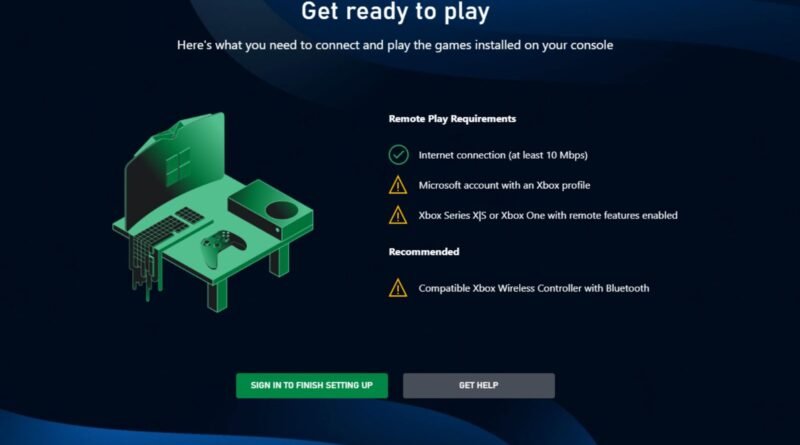
Getting Started: What You’ll Need
- An active Xbox Game Pass Ultimate subscription (this is essential, as Cloud Gaming is included with Ultimate).
- A compatible device (Android phone/tablet, iOS phone/tablet, Windows PC, Xbox console, or select Smart TVs).
- A stable internet connection (minimum 7-10 Mbps, but 20+ Mbps is recommended for the best experience).
- A compatible controller (an Xbox Wireless Controller is ideal, but many Bluetooth controllers work, and some games offer touch controls).
Devices and Controllers: Your Gaming Arsenal
The beauty of Cloud Gaming is its versatility. You can use your smartphone with a clip-on controller, your laptop, a desktop PC, or even your existing Xbox console to stream games you haven’t downloaded. For controllers, the Xbox Wireless Controller offers the most seamless experience, but many third-party Bluetooth controllers are also supported. For certain casual titles, Microsoft has even implemented touch controls directly on your phone or tablet screen, making them instantly playable without any extra gear.
The Game Library: What Can You Play?
The entire Xbox Cloud Gaming library is integrated directly into your Xbox Game Pass Ultimate subscription. This means you get access to hundreds of games, including all Xbox Game Studios titles on day one, a vast collection of third-party games, and various EA Play titles. The library is constantly updated, so there’s always something new to try. It’s an incredible value proposition, giving you a massive buffet of games to stream whenever the mood strikes.
With hundreds of games available at your fingertips, Xbox Cloud Gaming transforms your device into a portable arcade, always updated and ready to play. It’s truly a game-changer for exploration.
Cloud Gaming vs. Traditional Console Gaming: A Quick Look
| Feature | Xbox Cloud Gaming | Traditional Console Gaming |
|---|---|---|
| Hardware Required | Any compatible device (phone, PC, TV) | Dedicated Xbox console |
| Game Access | Stream instantly from Game Pass library | Download/install games; purchase discs/digital |
| Portability | Highly portable, play anywhere with internet | Limited to console location or handhelds |
| Initial Cost | Game Pass Ultimate subscription | Console purchase + Game Pass/games |
| Storage Needs | Virtually none on device | Significant storage required for games |
Tips for the Best Cloud Gaming Experience
- Internet Connection is Key: Use a wired Ethernet connection if possible, or a strong 5GHz Wi-Fi signal. Public Wi-Fi can be unreliable.
- Close Background Apps: Ensure your device isn’t bogged down by other apps running in the background, which can consume bandwidth and processing power.
- Controller Connection: Keep your controller charged and ensure a stable connection (wired is best for PCs, strong Bluetooth for mobile).
- Device Updates: Keep your device’s operating system, browser, and Xbox app updated to ensure optimal performance and compatibility.
- Experiment with Settings: If available, try adjusting streaming quality settings in the Xbox app to find a balance between visual fidelity and performance on your network.
I hope they don’t do away with compact disks, let alone internal storage!
The Future of Gaming is Here
Xbox Cloud Gaming isn’t just a novelty; it’s a powerful and evolving platform that’s democratizing gaming. It lowers the barrier to entry, makes gaming more flexible, and lets you explore a vast library of titles without a huge upfront investment in hardware. Whether you’re a seasoned gamer looking for more flexibility or a newcomer curious about the world of Xbox, Cloud Gaming offers an accessible and exciting way to play. So, grab your phone, pair a controller, and dive into a world of games, wherever you are!